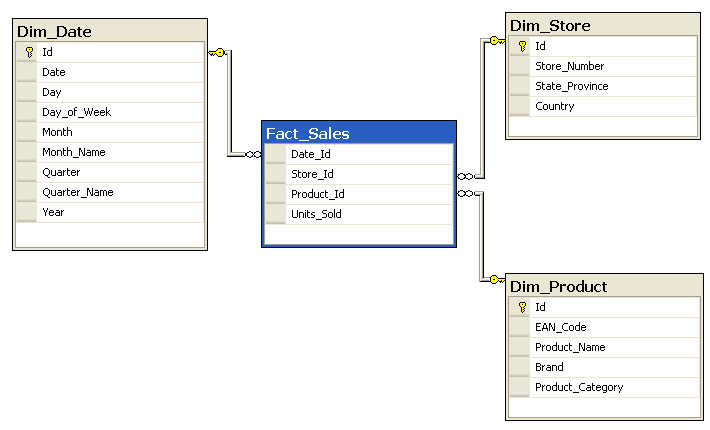
Information Management recently sent around their pick of best IM blog articles of 2009.  Among them was Forrester’s James Kobelius’s reaction to Bill Inmon’s “incineration of a straw man concept that he refers to as ‘virtual data warehousing (DW).’”

According to Mr. Inmon, virtual data warehousing reminds him of the carnival game called whac-a-mole.  He says “just when you think this incredibly inane idea has died and just when someone has delivered what should have been a deathly blow, out it pops again from another hole.” Continue reading »


Elements of IT Architecture

Many see IT as application of technology to solve business problems.

Of course, this is true but it leaves out the third element, which is to apply the right architectural pattern to solve the problem.  For example, when the business problem is that reporting is slow and reports from different departments don’t match, the astute IT professional immediately thinks in terms of a data warehousing pattern employing technologies like databases, extract-transform-load (ETL) tools, and multi-dimensional reporting suites. Continue reading »


Today, the foundation of most of our custom-built systems is a relational dbms.  While development frameworks vary, they overwhelmingly access and maintain data in relational tables and columns.  As I write I routinely save this post in a MySQL database, and at work I tend SQL Server applications.  Millions of others develop, use, and extract analytical data from thousands of SQL Server, DB2, and Oracle applications, on servers and networks maintained in-house by in-house administrators. Continue reading »


Here are three things to remember when putting together a BI business case:

InformationManagement

Excerpt from "Show Me the Money: A DM/BI Business Value Primer", Bob Lambert and Tri Truong, Information Management Special Reports, March 24, 2009

  1. Intangible benefits don’t count.
  2. BI has no inherent value.
  3. Senior managers often make decisions about future outcomes with insufficient data. Continue reading »
 

In a recent article at Information Management, Maria Villar and Theresa Kushner offer 4 Steps to Create an Effective IT and Business Partnership, a very useful list of ways to ensure “strong partnership between IT and business”.  To the authors this partnership “is the most important, and often overlooked, component to successfully managing critical business data. Undertaking business intelligence, data quality or an enterprise data management [program] without full cooperation and collaboration between IT and the business is a formula for frustration.”  The authors suggest these four steps: “know your partner, develop a relationship, define roles and responsibilities, and establish open, regular communication channels.”  I recommend reading this article because IT folks (like me) seem tempted to neglect the habits that enable building a solid relationship with business people. Continue reading »


It is a commonplace to say we should manage data like a resource. But when you think about it, data is an asset but not a resource.  Data isn’t a thing like real estate, employees, or customers, but rather it represents all of those things.  In data-geek-speak, data is a meta-resource that holds information about resources.  That makes data a lot like money. Continue reading »


A recurring theme in the literature on IT over the years has been frequent failure of IT projects.  Most studies lay the bulk of the blame on requirements (examples here and here).  One way to improve accuracy and fit-to-purpose of requirements, and thereby promote project success, is to include data analysis as well as process analysis in the requirements plan.

I’ve cited here the need to start data interface analysis early to avoid budget and schedule blow-ups when, as a result of not thinking early about interface complexity, data integration work turns out to be bigger and nastier than anticipated. Continue reading »


In a recent very thoughtful post on data quality, Paul Erb plays out an analogy comparing data users with Don Quixote and data quality professionals with Sancho Panza, then reverses the analogy to cleverly coin the “Sancho Panza” test of data quality professionals.  He encourages data quality professionals promoting the critical role of data quality to apply a what would Sancho say test to ensure that they are aligned with the needs and interests of data consumers. Continue reading »


—–

Update 10 January 2010: Thanks to Gints Plivna for observing that we had not posted the slides to this presentation, here they are: Pretty Good Row Level Security Slides.  – Bob

—–

Thanks to those who attended Saturday’s Microsoft Code Camp (see http://richmondcodecamp.org/).  Here are materials for the presentation “Pretty Good Row Level Security” which I did with Nic Morel, my fellow CapTech Ventures Lead Consultant. Continue reading »


In a new post at Insurance Networking News Ara Trembly provides a balanced perspective on IT/business misalignment (Business/IT Misalignment: Whose Responsibility?).  He describes the problem as cultural, more amenable to relational than management solutions.    His conclusion sums it up: “Take a geek/suit to lunch today!”

To me (speaking as an IT professional) IT should take the initiative to solve the problem.  Continue reading »

© 2011 Bob Lambert Suffusion theme by Sayontan Sinha